Free for macOS

Make images and videos, one node at a time.

Connect prompts, images and videos to the best AI models. Then run the graph.

Latest version · Apple silicon and Intel · macOS 11+

The SimpleNode canvas: two imported sticker sheets and prompts feed Nano Banana nodes that generate new sticker heads.
Nano Banana ProSeedream 5.0GPT Image 2FLUX.2Kling 4Veo 3.1Seedance 2.5MiniMax H3+30 more
Inside the app

See it in action.

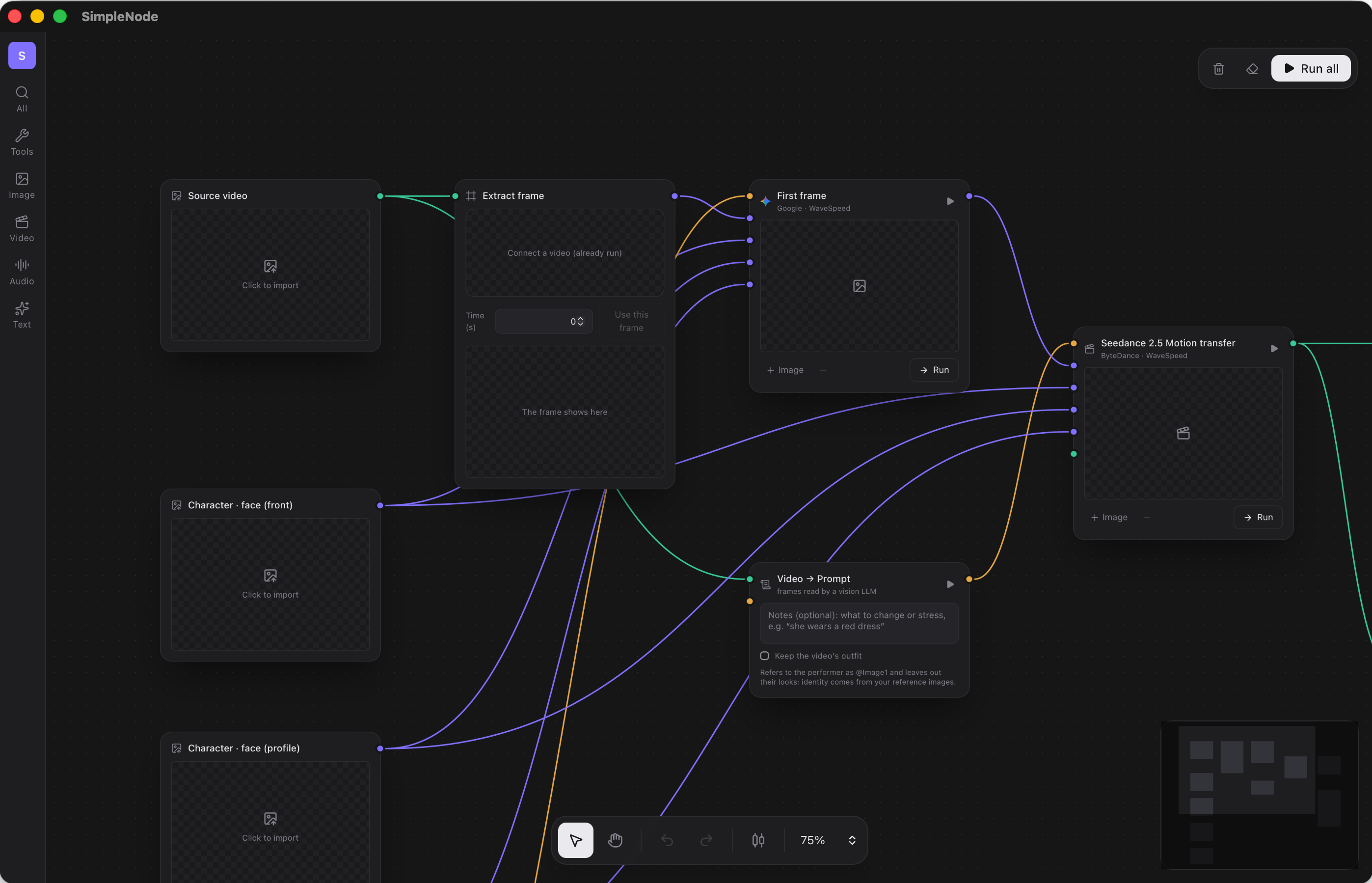
The Recreate a video workflow: source video, extracted frame and character images feed Seedance 2.5 Motion transfer, guided by a Video → Prompt node.

Recreate a video

Your character, the video's moves.

A character image and a setting image feed Nano Banana Pro with a short prompt.

Put a character in a scene

Two images and one sentence.

Settings → Costs: the price of every image model, per image or per unit.

Every price up front

The cost of each model, before you run.

Settings: fal.ai, WaveSpeed and BytePlus API keys, stored on this computer.

Your keys, your accounts

fal.ai, WaveSpeed or BytePlus, stored on your Mac.

Features

From idea to final cut.

Never pay twice

Price shown before every run.

Image models

Nano Banana, Seedream, GPT Image 2, FLUX.

Video models

Kling, Veo 3.1, Seedance 2.5, MiniMax.

Recast

Put your character into any video.

Compositor

Edit on a timeline, render for free.

Upscale and export

Up to 4K, 60 fps, ProRes.

Video → Prompt

Turn any video into a timed prompt.

Music and sound

Generate music and effects, add them to a video.

Claude Code

Let Claude build and run your graphs.

FAQ

Questions

How much does it cost?

The app is free. You pay fal.ai or WaveSpeed for what you generate, from a few cents for an image to about a dollar for a video. SimpleNode shows the price before every run.

Do I need a fal.ai account?

No. A WaveSpeed key runs most of the models. A few models and tools only exist on fal.ai, and the app marks them "fal only".

Which Macs does it run on?

Every Mac with an Apple silicon chip (M1 and later) or an Intel chip, on macOS 11 or later. The same download works on both.

macOS blocks the app on first launch

Open System Settings → Privacy & Security, then click Open Anyway. If macOS says the app "is damaged", run xattr -dr com.apple.quarantine /Applications/SimpleNode.app in Terminal.

Can I be billed twice for the same result?

No. "Run all" skips the nodes that already have a result. To redo one, run that node on its own.

Where are my files and keys stored?

On your Mac only. Results are downloaded as soon as they're ready, because the providers' links expire.

What does the Compositor need?

ffmpeg, installed once with Homebrew: brew install ffmpeg. The rest of the app works without it.

Does it work with Claude?

Yes. Turn on the MCP server in Settings → MCP, and Claude Code can build and run workflows on your canvas, within the spending cap you set.

How do I update the app?

Download the latest version from this page and drag it into Applications again. Your projects and keys are kept.

Is there a Windows version?

Not yet. SimpleNode is for macOS only.

Build your first workflow today.

Latest version · free · macOS 11+